Getting Started: A Minimal Working Example
Guangyu Zhu
Source:vignettes/10-minimal-working-example.Rmd
10-minimal-working-example.RmdThis section aims to help you grasp the basic workflow to run this package. In this section, we will outline the main functionality of the package and demonstrating a minimal working example that can be run with minimal knowledge about EAMs.
The workflow implemented in eam follows the standard workflow in simulation-based inference. First, we begin by specifying a data-generating process, simulate data under a range of parameter values, and then use simulation-based inference to learn which parameters are most consistent with the observed data.
Concretely, the workflow consists of four steps:
- Model specification and simulation: Define an evidence accumulation model by specifying its structural components (boundaries, drift, noise, and non-decision processes), and simulate synthetic datasets from the prior.
- Summary statistics computation: Reduce both simulated and observed data to informative summary statistics that capture key data patterns.
- Parameter estimation and recovery: Use ABC (or ABI) to infer posterior distributions over parameters, and evaluate whether the inference procedure can reliably recover known parameters.
- Model evaluation and comparison: Assess model adequacy using posterior predictive checks, and compare alternative model specifications.
The following sections walk through these steps in detail using a simple DDM example, before extending the workflow to more complex models.
In this example, we start with a simple three-parameter two-boundary Diffusion Decision Model (DDM).
Although the DDM has a trackable likelihood, we deliberately treat it as a generative model here. This allows us to demonstrate the full simulation-based workflow in a setting where the ground truth is known.
Here, we adopt a slightly different parameterization from the conventional DDM: instead of assuming accumulation from a positive starting point toward 0 or , evidence is initialized at zero and evolves toward symmetric bounds at and .
Description of the model
The details of this model is listed below:
Priors on global parameters
Item-level parameterization
Evidence accumulation dynamics
A decision is made when first reaches either or , and the observed response time is
Data Simulation Pipeline
Step one: Model setup
First, we load the required packages.
# Load necessary packages
library(eam)
library(dplyr)
#> Warning: 程序包'dplyr'是用R版本4.5.2 来建造的
library(rtdists)
library(tidyr)
Then, we specify the model configuration according to the setup described above.
#######################
# Model specification #
#######################
# Define the number of accumulators
n_items <- 1

# Set the number of accumulators in the model
prior_params <- tibble(
  n_items = n_items
)

# Specify the prior distributions for free parameters
prior_formulas <- list(
  # Decision boundary
  A_0 ~ distributional::dist_uniform(1, 5),
  # Drift rate
  V_0 ~ distributional::dist_uniform(0.5, 3),
  # Non-decision time
  ndt_0 ~ distributional::dist_uniform(0, 1),
  # Relative starting point
  rho_0 ~ 0.5
)

# Specify the between-trial components (skipped here)
between_trial_formulas <- list()

# Specify the item-level parameters
item_formulas <- list(
  # Relative starting point
  rho ~ rho_0,
  # Decision boundary
  A_upper ~ rho * (A_0), # upper
  A_lower ~ -rho * (A_0), # lower
  # Drift rate
  V ~ V_0,
  # Non-decision time
  ndt ~ ndt_0
)

# Specify the diffusion noise
noise_factory <- function(context) {
  function(n, dt) {
    rnorm(n, mean = 0, sd = sqrt(dt))
  }
}
Step two: Data simulation
Once the model is specified, we can proceed to data simulation. The simulation step generates a large collection of synthetic datasets by sampling parameters from their prior distributions and simulating data from the corresponding generative model. Each simulated dataset represents a possible outcome implied by the assumed model.
####################
# Simulation setup #
####################
sim_config <- new_simulation_config(
  # Pass the model information
  prior_formulas = prior_formulas,
  between_trial_formulas = between_trial_formulas,
  item_formulas = item_formulas,
  # Specify the simulation conditions and number of trials
  n_conditions = 5000,
  n_trials_per_condition = 100,
  # Specify the number of accumulators and the number of recorded accumulators
  n_items = n_items,
  max_reached = n_items,
  # Specify the total elapsed time and time step
  max_t = 10,
  dt = 0.001,
  # Specify the noise structure
  noise_mechanism = "add",
  noise_factory = noise_factory,
  # Specify the model type
  model = "ddm",
  # Specify the parallel computing settings
  parallel = TRUE, # In tutorial, we disable parallelization, but you are encouraged to enable it locally
  n_cores = NULL, # When parallel enabled, will use default: detectCores() - 1
  rand_seed = NULL # Will use default random seed
)

##################
# Run simulation #
##################
sim_output <- run_simulation(
  config = sim_config
)
Here is an example of the simulated dataset.
Each row of the dataset represents a single simulated decision trial. The columns are defined as follows:
condition_idx: Index of the experimental condition under which the trial was simulated.
trial_idx: Index of the trial within each condition.
rank_idx: Rank position associated with the item or response in the simulated task (e.g., output order in recall or decision sequence).
item_idx: Index of the item being evaluated or responded to in that trial.
rt: Simulated response time for the decision in that trial.
choice: Binary decision outcome for the trial (e.g., 1 = correct / upper option; 0 = incorrect / lower option).
model parameters (A_0, V_0, ndt_0, rho_0): Parameters of the underlying decision model used to generate the data
chunk_idx: Index identifying the simulated batch or chunk of data generation, useful for tracking parallel or segmented simulation runs.
sim_output_data <- sim_output$open_dataset() |> dplyr::collect()

head(sim_output_data)
#>   condition_idx trial_idx rank_idx item_idx        rt choice      A_0      V_0     ndt_0 rho_0
#> 1             1         1        1        1 0.4260942      1 1.975088 2.109242 0.2750942   0.5
#> 2             1         2        1        1 0.7960942      1 1.975088 2.109242 0.2750942   0.5
#> 3             1         3        1        1 0.4510942      1 1.975088 2.109242 0.2750942   0.5
#> 4             1         4        1        1 0.5060942      1 1.975088 2.109242 0.2750942   0.5
#> 5             1         5        1        1 0.4760942      1 1.975088 2.109242 0.2750942   0.5
#> 6             1         6        1        1 0.5180942     -1 1.975088 2.109242 0.2750942   0.5
#>   chunk_idx
#> 1         1
#> 2         1
#> 3         1
#> 4         1
#> 5         1
#> 6         1
Step three: Load observed data
For observed data, we create a small dataset using the
rtdists package, which provides fast simulators for
standard DDM. Specifically, we simulate N = 500 trials from
a two-boundary DDM with fixed parameters
(,
,
)
where
controls boundary separation,
is the drift rate, and
captures non-decision time.
The function rdiffusion() returns response labels
("upper"/"lower") and response times. For
consistency with the data format produced by our simulation engine, we
recode responses into a numeric choice variable (1 for the upper
boundary and -1 for the lower boundary), and we add a
condition_idx field to indicate that all trials belong to a
single experimental condition.
############################
# Observed data generation #
############################

N <- 1000

pars <- list(
  a  = 2.0,   # Decision boundary
  v  = 1.0,   # Drift rate
  t0 = 0.5  # Non-decision time
)

# rdiffusion() will return responses and RTs from a standard DDM
observed_data <- rdiffusion(n = N, a = pars$a, v = pars$v, t0 = pars$t0)

# Recode the data to be consistent with simulated data
observed_data$choice <- ifelse(observed_data$response == "upper", 1, -1)
observed_data$condition_idx <- 1
Finally, the observed dataset should be organized as follows:
head(observed_data)
#>          rt response choice condition_idx
#> 1 1.2231327    upper      1             1
#> 2 1.0655246    upper      1             1
#> 3 1.0629394    upper      1             1
#> 4 0.8827105    upper      1             1
#> 5 1.4909006    upper      1             1
#> 6 0.8059849    upper      1             1
Approximate Bayesian Computation Pipeline
Step four: Extract summary statistics
We define a summary pipeline that extracts two types of common summary statistics of the DDM data: (i) the accuracy and (ii) RT quantiles (10%, 30%, 50%, 70%, 90%) computed separately for each choice category (1 vs. -1).
We then apply the same summary procedure to every simulated dataset
to obtain simulation_sumstat, and to the observed dataset
to obtain target_sumstat. Finally,
build_abc_input() aligns the simulated and observed
summaries into a consistent structure.
#####################
# abc model prepare #
#####################

# Define the summary procedure
summary_pipe <-
  summarise_by(
    .by = c("condition_idx"),
    acc = sum(choice == 1) / sum(!is.na(choice)),
  ) +
  summarise_by(
    .by = c("condition_idx", "choice"),
    rt_quantiles = quantile(rt, probs = c(0.1, 0.3, 0.5, 0.7, 0.9))
  )

# Calculate simulated summary statistics
simulation_sumstat <- map_by_condition(
  sim_output,
  .progress = TRUE,
  .parallel = FALSE, # turn on if you want to speed up
  function(cond_df) summary_pipe(cond_df)
)

# Calculate observed summary statistics
target_sumstat <- summary_pipe(observed_data)

# Align the simulated and observed summary statistics
abc_input <- build_abc_input(
  simulation_output = sim_output,
  simulation_summary = simulation_sumstat,
  target_summary     = target_sumstat,
  param = c("A_0", "V_0", "ndt_0")
)
Step five: Fit the model
With the simulated and observed summary statistics aligned, we can now estimate the posterior distribution of the model parameters using Approximate Bayesian Computation (ABC).
Specifically, we fit an ABC model by comparing the simulated summary
statistics to the observed summary statistics. Then we retain (or
reweight) parameter draws that best reproduce the observed summaries
under a tolerance level (tol = 0.05).
Here we use a regression-based-adjusted ABC variant
(method = "loclinear"), which learns a flexible mapping
from summary statistics to parameters to improve posterior
approximation.
These diagnostics help verify whether the posterior concentrates on
plausible regions of the parameter space and whether the recovered
parameters are consistent with the parameters in the
rdiffusion() model.
########################
# Parameter estimation #
########################

# Fit abc model (neuralnet)
abc_fit <- abc::abc(
  target = abc_input$target,
  param  = abc_input$param,
  sumstat= abc_input$sumstat,
  tol    = 0.05,
  method = "neuralnet"
)
#> Warning: All parameters are "none" transformed.
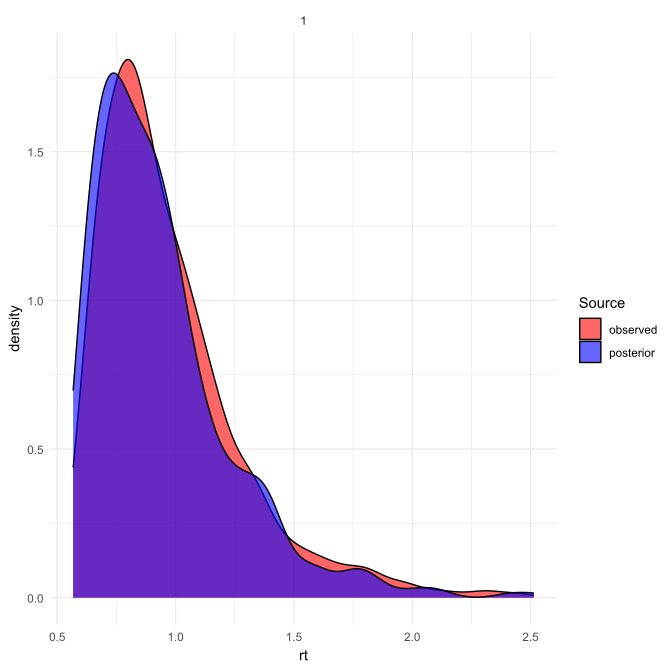
After fitting, we summarize the posterior means/medians and 95% credible intervals and visualize the resulting posterior distributions.
As shown, the true parameter values underlying the observed data lie well within the 95% credible intervals of the posterior distributions.
# Posterior estimation check
summarise_posterior_parameters(
  abc_fit,
  ci_level = 0.95
)
#>   parameter      mean    median ci_lower_0.025 ci_upper_0.975
#> 1       A_0 2.1521676 2.1329682      1.8822137      2.4647523
#> 2       V_0 0.9994105 0.9967066      0.7438985      1.2538704
#> 3     ndt_0 0.4429218 0.4499385      0.3326319      0.5312672

plot_posterior_parameters(
  abc_fit,
  abc_input
)
Step six: Model evaluation
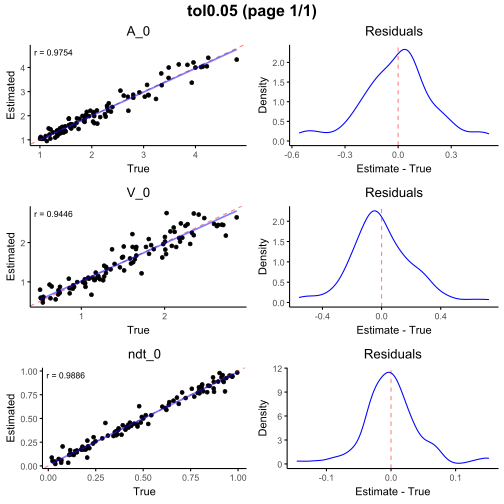
The next step is to evaluate parameter recovery for the model. To do
so, we run cv4abc() as a cross-validation procedure.
First, we specify the number of validation datasets
(N = 100). The function then randomly samples
N conditions from the simulated summary statistics, treats
their associated parameter values as known ground truth, and
re-estimates the parameters using the fitted ABC object under the same
tolerance level.
Recovery performance is visualized using
plot_cv_recovery(), which compares the estimated parameters
with their true values across validation datasets.
Good recovery is indicated by a high correlation between estimated and true parameters (good: ; excellent: ) and by estimates clustering closely around the identity line with minimal residual dispersion.
The resid_tol option trims extreme residuals (here
retaining the central 99%), making the main recovery pattern easier to
inspect.
As shown, the three parameters exhibit excellent recovery.
# Parameter recovery check
abc_cv <- abc_cv(
  abc_input = abc_input,
  abc_result = abc_fit,
  nval = 100,
  tols = c(0.05)
)
plot_cv_recovery(
  abc_cv,
  n_rows = 3,
  n_cols = 1,
  resid_tol = 0.99,
  interactive = FALSE
)
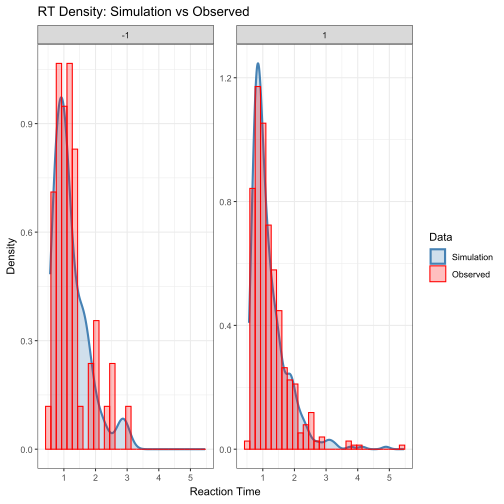
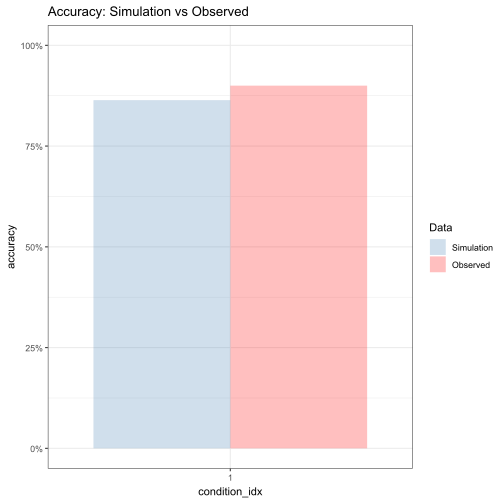
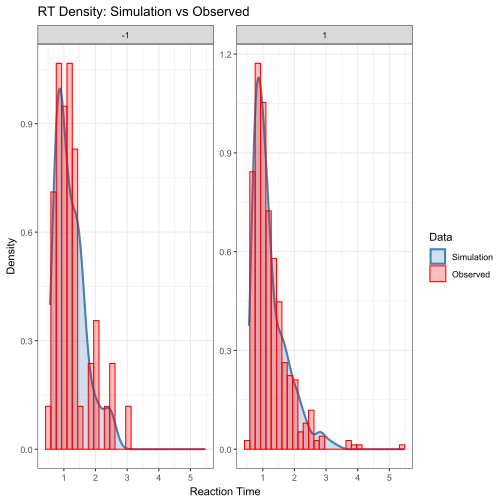
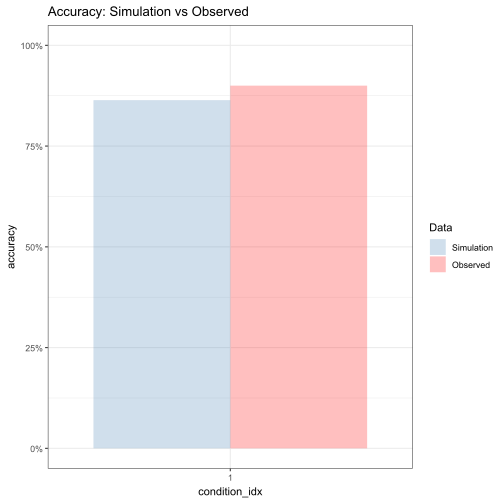
As a final diagnostic, we perform a posterior predictive check to assess the adequacy of the fitted model.
Specifically, we generate the posterior data using posterior median estimates obtained from the ABC analysis. The resulting posterior predictive simulations are then compared with the observed dataset.
By visually inspecting the overlap between simulated and observed RT distributions and accuracy rates, we can evaluate whether the fitted model is able to reproduce key empirical patterns.
##############################
# Posterior predictive check #
##############################

abc_posterior_predictive_check(
  config = sim_config, # Simulation configuration
  abc_result = abc_fit, # ABC fitting result
  observed_df = observed_data,  # Observed dataset for comparison
  n_conditions = 1, # Number of experimental conditions
  n_trials_per_condition = 500, # Number of trials simulated per condition
  rt_facet_x = c("choice"), # RT plot facet (x)
  rt_facet_y = c(),   # RT plot facet (y)
  accuracy_x = "rank_idx",  # Accuracy plot x-axis variable
  accuracy_facet_x = c(), # Accuracy plot facet (x)
  accuracy_facet_y = c()  # Accuracy plot facet (y)
)
Step seven (optional): Model comparison
Beyond parameter estimation, the eam package also supports model comparison within a simulation-based inference framework.
In this example, we construct an alternative model by deliberately modifying the prior specification of the relative starting point parameter , while keeping all other components of the model unchanged. This allows us to isolate the contribution of this parameter assumption to overall model fit. Synthetic data are then generated under the alternative model, and the same summary statistics pipeline is applied to ensure comparability across models.
Model comparison is conducted using the abc_postpr()
function, which estimates posterior model probabilities based on
Approximate Bayesian Computation. Intuitively, this procedure assesses
which model is more likely to have generated the observed data by
comparing the proximity of simulated summary statistics from each model
to the target summary statistics, given a fixed tolerance level.
The resulting posterior probabilities indicate the relative likelihood that the observed data were generated by each candidate model. These probabilities can be summarized using Bayes factors, which quantify the strength of evidence in favor of one model over another. Conventionally, Bayes factors greater than 3 or smaller than 1/3 are interpreted as providing substantial evidence for one model relative to its competitor.
# Deliberately change the rho in the alternative model
prior_formulas_alt <- list(
  # Decision boundary
  A_0 ~ distributional::dist_uniform(1, 5),
  # Drift rate
  V_0 ~ distributional::dist_uniform(0.5, 3),
  # Non-decision time
  ndt_0 ~ distributional::dist_uniform(0, 1),
  # Relative starting point
  rho_0 ~ 0.7
)

sim_config_alt <- sim_config
sim_config_alt$prior_formulas <- prior_formulas_alt

# Run the simulation
sim_output_alt <- run_simulation(
  config = sim_config_alt
)

# Calculate simulated summary statistics for the alternative model
simulation_sumstat_alt <- map_by_condition(
  sim_output_alt,
  .progress = TRUE,
  .parallel = FALSE,
  function(cond_df) summary_pipe(cond_df)
)

abc_input_alt <- build_abc_input(
  simulation_output = sim_output_alt,
  simulation_summary = simulation_sumstat_alt,
  target_summary = target_sumstat,
  param = c("A_0", "V_0", "ndt_0")
)

# Run the model comparison
postpr_result <- abc_postpr(
  sumstats = list(
    abc_input$sumstat,
    abc_input_alt$sumstat
  ),
  target = abc_input$target,
  tol = 0.05,
  method = "rejection"
)

summary(postpr_result)
#> Call:
#> abc::postpr(target = target, index = index, sumstat = sumstat,
#>     tol = 0.05, method = "rejection")
#> Data:
#>  postpr.out$values (500 posterior samples)
#> Models a priori:
#>  model_1, model_2
#> Models a posteriori:
#>  model_1, model_2
#>
#> Proportion of accepted simulations (rejection):
#> model_1 model_2
#>   0.902   0.098
#>
#> Bayes factors:
#>         model_1 model_2
#> model_1  1.0000  9.2041
#> model_2  0.1086  1.0000
Amortized Bayesian Inference Pipeline (Point Estimation)
Step four: Prepare input features
We construct the input matrix from the observed data, containing trial-level choice and reaction time (RT).
This dataset is organized so that each column corresponds to one trial. For each trial, the first row gives the choice outcome, coded as -1 or 1, and the second row gives the corresponding response time (rt).
So you can think of each column as a pair of observations: choice and RT for that trial.
This format directly matches the ABI input structure, where Z is a fixed-dimensional matrix of trial-level data, with rows representing features (here, choice and RT) and columns representing individual trials.
The same structure is used for both simulated and observed datasets.
The function build_abi_input() then aligns simulated
data and parameters into a consistent format for training.
#####################
# abc model prepare #
#####################
library(dplyr)
library(tidyr)

Z_observed <- observed_data %>%
  mutate(trial = row_number()) %>%
  select(trial, choice, rt) %>%
  pivot_longer(
    cols = c(choice, rt),
    names_to = "variable",
    values_to = "value"
  ) %>%
  pivot_wider(
    names_from = trial,
    values_from = value
  )

Z_observed <- as.matrix(Z_observed[, -1])

head(Z_observed[,1:5])
#>             1        2        3         4        5
#> [1,] 1.000000 1.000000 1.000000 1.0000000 1.000000
#> [2,] 1.223133 1.065525 1.062939 0.8827105 1.490901

# Align the simulated and observed summary statistics
abi_input <- build_abi_input(
  sim_output,
  theta = c(
    "A_0", "V_0", "ndt_0"
  ),  # model parameters to be inferred
  Z = c(
    "choice",
    "rt"
  ),    # observed data features used for inference
  train_ratio = 0.8,  # proportion of simulated data used for training and testing (80% for training and 20% for testing)
  n_test = 100   # number of samples reserved for cross validation
)
Step five: Fit the model
We train a neural estimator to learn the mapping from observed data to model parameters .
Here we use a point estimator, which directly predicts parameter values from the input data.
The input dimension d = 2 corresponds to the two
observed variables per trial (choice and RT). The DeepSet encoder maps a
set of trials into a fixed-length representation, which is then
transformed into parameter estimates.
The output dimension equals the number of parameters
(p = 3), with each parameter predicted by a dedicated
output unit using a softplus activation to enforce valid (positive)
values.
########################
# Parameter estimation #
########################

# Fit abi model
point_estimator <- "
  d = 2    # dimension of data features
  w = 32   # number of neurons in each hidden layer

  # Layer to ensure valid estimates
  final_layer = Parallel(
      vcat,
      Dense(w, 1, softplus), #first model parameter
      Dense(w, 1, softplus), #second model parameter
      Dense(w, 1, softplus)  #third model parameter
    )

  psi = Chain(Dense(d, w, relu), Dense(w, w, relu), Dense(w, w, relu))
  phi = Chain(Dense(w, w, relu), Dense(w, w, relu), final_layer)
  deepset = DeepSet(psi, phi)
  estimator = PointEstimator(deepset)
"

trained_point_estimator <- abi_train(
  estimator = point_estimator,
  abi_input = abi_input,
  epochs = 200,
  stopping_epochs = 20,
  verbose = FALSE
)
After training, we obtain point estimates of the parameters for the observed dataset.
# Point estimation check
point_est <- abi_estimate(
  trained_estimator = trained_point_estimator,
  Z = Z_observed
)

point_est
#>        estimate
#> A_0   2.0368655
#> V_0   1.0363948
#> ndt_0 0.4494624
Step six: Model evaluation
We evaluate parameter recovery using simulated datasets.
The function abi_assess() performs a validation
procedure by:
- sampling datasets with known parameters
- re-estimating parameters using the trained estimator
- comparing estimated vs true parameters
Good recovery is indicated by high correlation between estimated and true values estimates concentrated around the identity line
# Parameter recovery check
assessment <- abi_assess(
  trained_estimator = trained_point_estimator,
  estimator_name = "NBE"
)
#>  Running NBE...

plot_cv_recovery(assessment)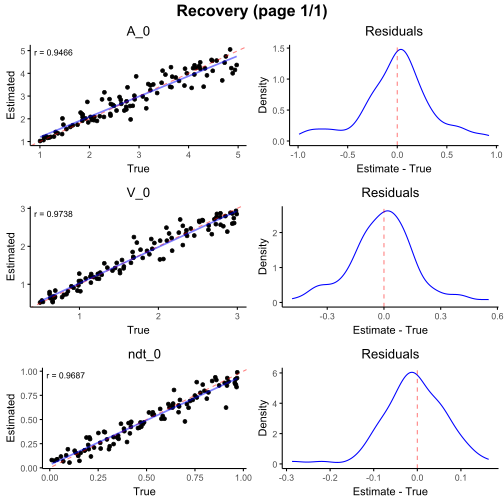
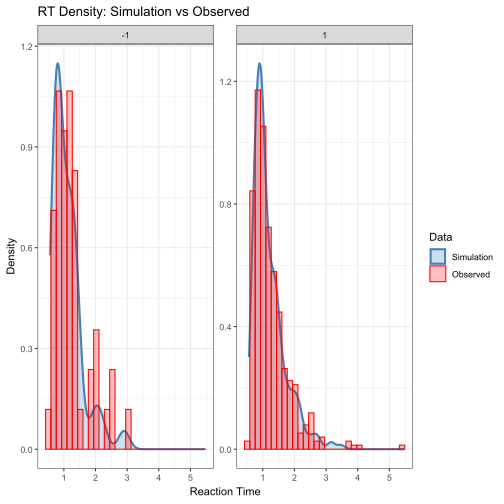
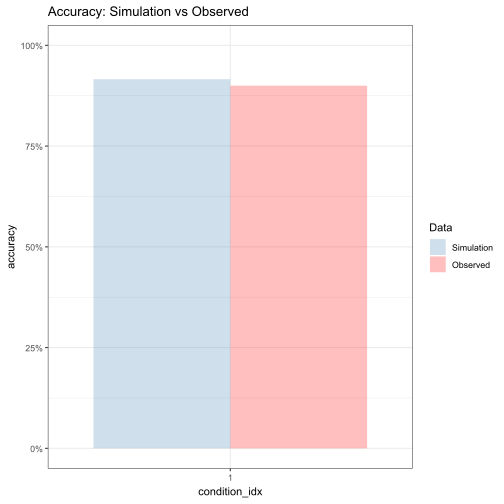
We assess model fit by generating simulated data using the estimated parameters and comparing them to the observed data.
This allows us to evaluate whether the model reproduces RT distributions and choice proportions
##############################
# Posterior predictive check #
##############################

abi_posterior_predictive_check(
  config = sim_config,
  trained_estimator = trained_point_estimator,
  estimator_type = "point",
  observed_df = observed_data,
  Z = Z_observed,
  rt_facet_x = c("choice"),
  rt_facet_y = c(),
  accuracy_x = "",
  accuracy_facet_x = c(),
  accuracy_facet_y = c()
)
Amortized Bayesian Inference Pipeline (Posteiror Sample Estimation)
Step four: Prepare input features
(Same as above)
#####################
# abc model prepare #
#####################

Z_observed <- observed_data %>%
  mutate(trial = row_number()) %>%
  select(trial, choice, rt) %>%
  pivot_longer(
    cols = c(choice, rt),
    names_to = "variable",
    values_to = "value"
  ) %>%
  pivot_wider(
    names_from = trial,
    values_from = value
  )

Z_observed <- as.matrix(Z_observed[, -1])

# Align the simulated and observed summary statistics
abi_input <- build_abi_input(
  sim_output,
  theta = c(
    "A_0", "V_0", "ndt_0"
  ),
  Z = c(
    "choice",
    "rt"
  ),
  train_ratio = 0.8,
  n_test = 100
)
Step five: Fit the model
Instead of predicting a single point estimate, we learn the full posterior distribution.
The input dimension d = 2 corresponds to the two
observed variables per trial (choice and RT).
The DeepSet encoder maps a set of trials into a fixed-length representation.
The output dimension equals the number of parameters
(p = 3).
Instead of producing point estimates, a normalizing flow is used to generate samples from the posterior distribution over parameters.
########################
# Parameter estimation #
########################

# Fit abi model
posterior_estimator <- "
  d = 2    # dimension of data features
  w = 32   # number of neurons in each hidden layer

  # Layer to ensure valid estimates
  final_layer = Parallel(
      vcat,
      Dense(w, 1, softplus), #first model parameter
      Dense(w, 1, softplus), #second model parameter
      Dense(w, 1, softplus)  #third model parameter
    )

  psi = Chain(Dense(d, w, relu), Dense(w, w, relu), Dense(w, w, relu))
  phi = Chain(Dense(w, w, relu), Dense(w, w, relu), final_layer)
  deepset = DeepSet(psi, phi)
  w = 3 #number of model parameter
  q = NormalisingFlow(w, w)
  estimator = PosteriorEstimator(q, deepset)
"

trained_posterior_estimator <- abi_train(
  estimator = posterior_estimator,
  abi_input = abi_input,
  epochs = 200,
  stopping_epochs = 20,
  verbose = FALSE
)
After training, we draw samples from the posterior distribution.
# Posterior sample estimation check
posterior_samples <- abi_sample_posterior(
  trained_estimator = trained_posterior_estimator,
  Z = Z_observed,
  N = 1000
)

# Summarise posterior parameters
posterior_summary <- summarise_posterior_parameters(posterior_samples)
print(posterior_summary)
#>   dataset_id parameter      mean    median ci_lower_0.025 ci_upper_0.975
#> 1          1       A_0 2.0424385 2.0357143      1.7971618      2.3020147
#> 2          1       V_0 0.9913434 0.9835609      0.7950293      1.2071608
#> 3          1     ndt_0 0.4821002 0.4846332      0.3948782      0.5595917
Step six: Model evaluation
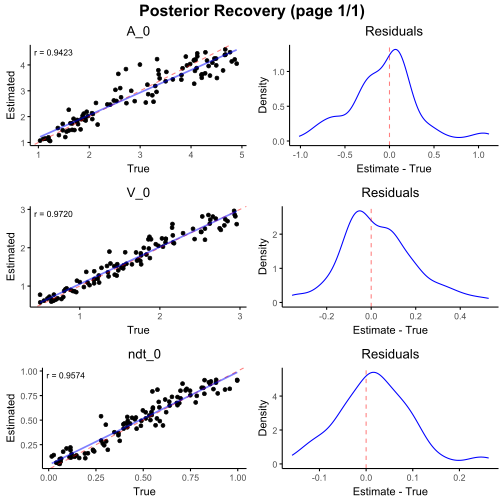
We evaluate posterior recovery by comparing median of posteiror samples of parameters with ground truth.
# Parameter recovery check
posterior_samples <- abi_sample_posterior(
  trained_estimator = trained_posterior_estimator,
  N = 1000
)

plot_cv_recovery(
  posterior_samples,
  trained_estimator = trained_posterior_estimator
)
We assess model fit by generating simulated data using the median of posteiror samples of parameters and comparing them to the observed data.
This allows us to evaluate whether the model reproduces RT distributions and choice proportions
##############################
# Posterior predictive check #
##############################

abi_posterior_predictive_check(
  config = sim_config,
  trained_estimator = trained_posterior_estimator,
  estimator_type = "posterior",
  observed_df = observed_data,
  Z = Z_observed,
  posterior_dataset_id = 1,
  posterior_n_samples = 1000,
  rt_facet_x = c("choice"),
  rt_facet_y = c(),
  accuracy_x = "",
  accuracy_facet_x = c(),
  accuracy_facet_y = c()
)
This is the end of this example.
This simple DDM example serves as a reference template for the rest of the tutorial. Once this workflow is clear, extending it to more complex models in eam mainly involves modifying the model components, while the overall inference pipeline remains unchanged.